Velocer › Features › Lecture recording to flashcards
Velocer features
Record a lecture, get the transcript and flashcards
Record in class or upload a recording. Velocer writes a transcript with timestamps, marks the passages your lecturer stressed, and turns it into flashcards.
Try it free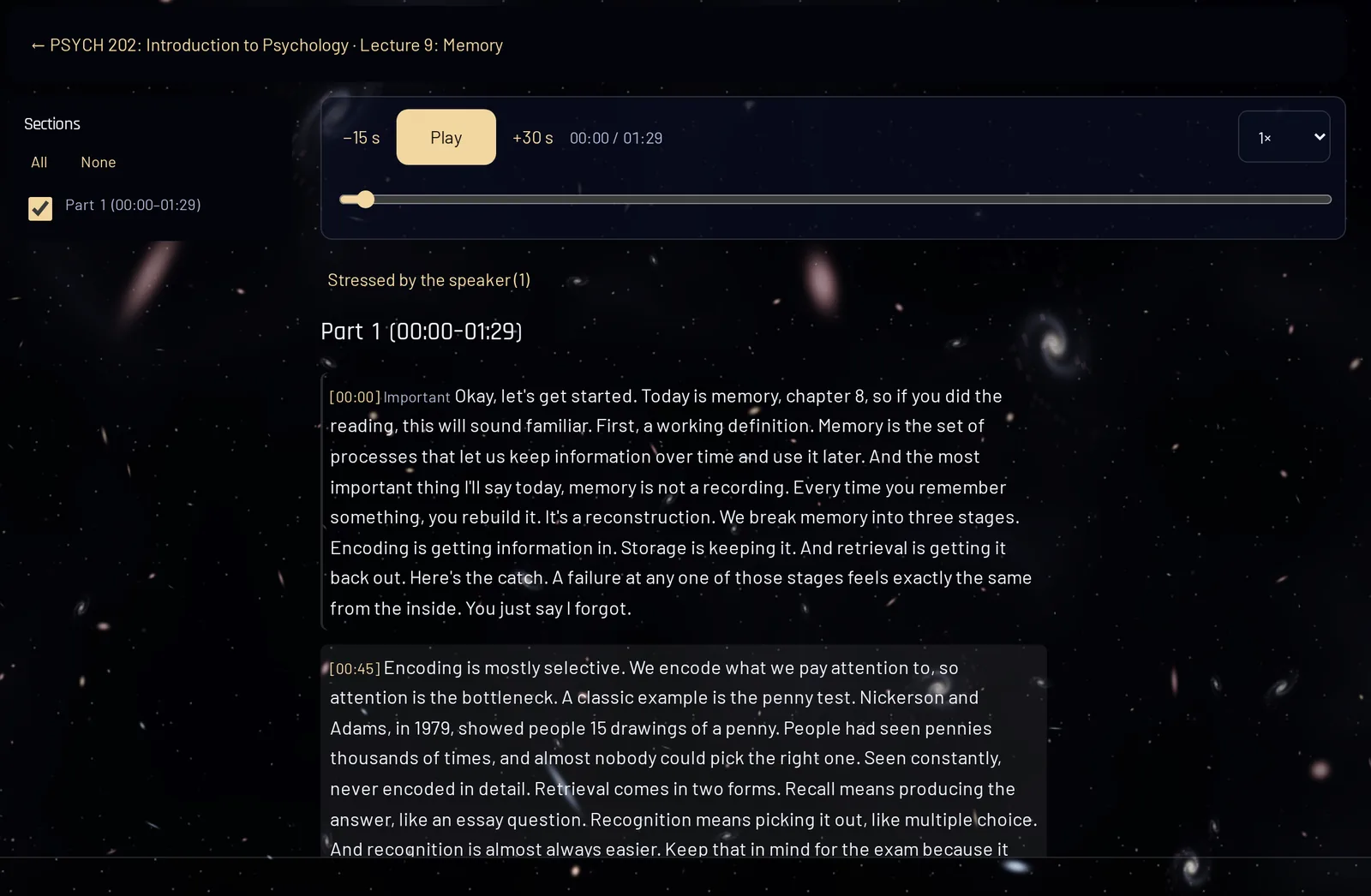
How it works
Record or upload
Press Record lecture in any class, or upload a recording: MP3, M4A, WAV and the other common formats, including voice memos from your phone. The recording is saved on your device while it records, so a dropped connection does not lose it.

Record lecture sits on every class; the recording shows Transcript ready. Read and replay the transcript
Tap a paragraph to hear that part again. Passages where the lecturer stressed a point are marked, and Stressed by the speaker jumps you through them.
Make flashcards from it
The transcript works like any other file: tick the parts you need and press Make flashcards, or make a study guide from the same parts.
Who it is for
People who learn by listening: a lecture hall, a seminar, a training session at work, a talk you want to keep. If you can record it or you have the audio, you can read it back, hear any part again and study it.
Then study it your way
Your cards go into spaced repetition, five drill modes (ladder, sprint, in context, own words, dictation), five games, a scored practice exam and a study plan paced to your exam date. Study with ambient music and the background you like. Velocer works in any browser and keeps your progress in step across your devices; the iPhone and Android apps are on the way, and the Chrome extension sends a page or a Canvas file straight in.
Free and Plus
- 60 minutes of lectures a month
- Transcript, marks and flashcards included
- 1,500 minutes of lectures a month
- Everything in Free
Questions
- What can I upload?
- MP3, M4A, WAV, WebM, OGG, Opus, AAC and FLAC, plus phone voice memos (.m4a, .3gp, .amr), up to 50 MB a file.
- What if my phone loses the connection while recording?
- Nothing is lost. The recording is saved on your device as it goes, and you can finish sending it later.
- How does it know what was important?
- It marks passages where the lecturer stresses a point, for example by saying it will be on the exam, so you can find them without replaying the whole class.
- Can I get cards from my slides too?
- Yes. Put the slides and the recording in the same class and make cards from either one. See PDF to flashcards.
- Is it free?
- Yes, 60 minutes a month. Plus is $9.99 a month or $59.99 a year. It raises that to 1,500 minutes.
More you can do with your material
Decks to start with
Not ready to upload anything? Flashcard decks shared by learners: course decks by school, such as UW–Madison, and language flashcards by topic with example sentences, from Spanish and Japanese to Bengali and Swahili. For what the research says about studying, read Atlas Nova.