Velocer › Features › Practice exams from your notes
Velocer features
Make a practice exam from your own notes
Any deck can become a scored exam, including cards made from your slides and lecture recordings. Pick the number of questions and the kinds you want, then take it on screen or print it.
Try it free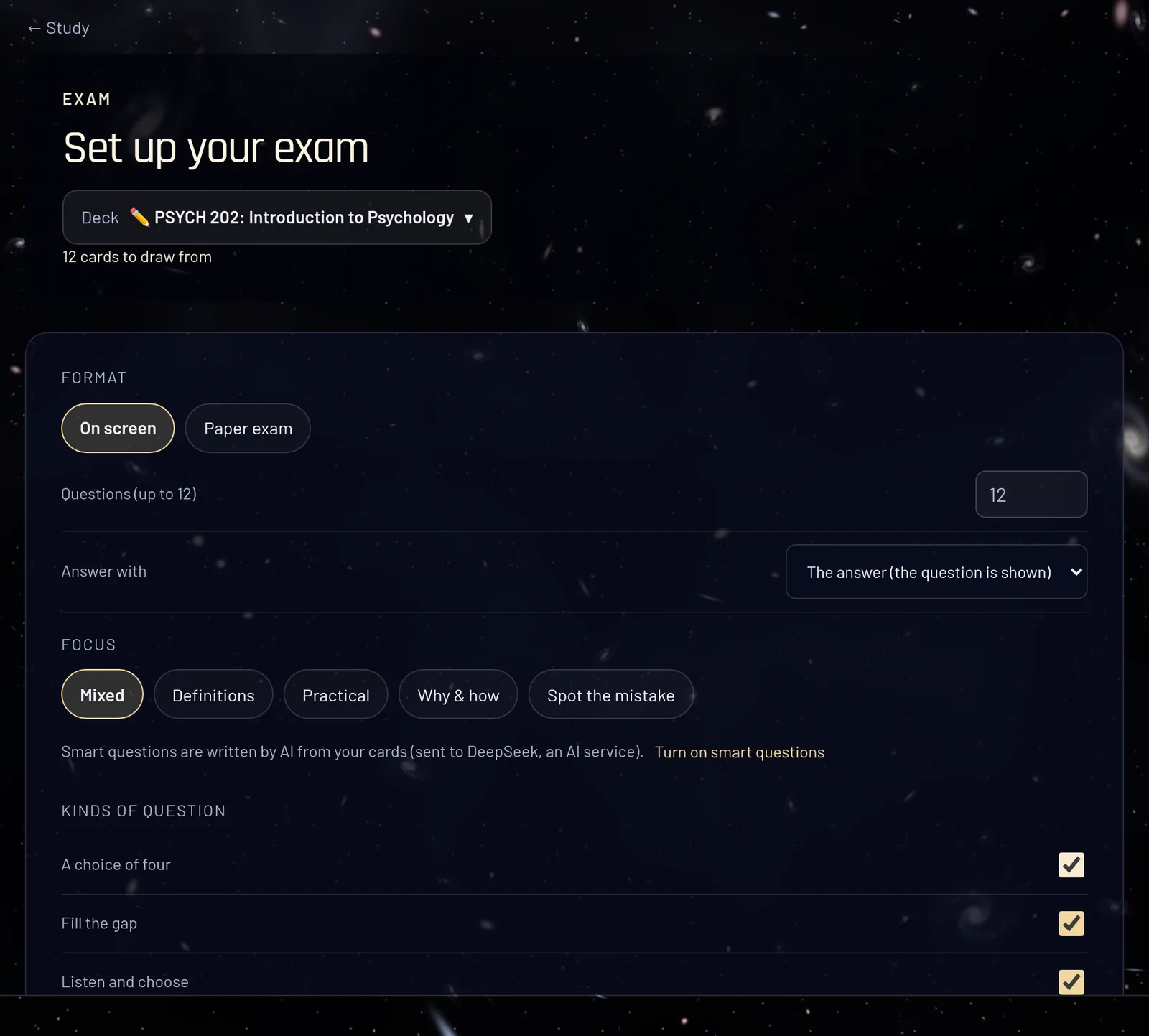
How it works
Start from your cards
Use a deck you made, cards from your slides and PDFs, or a lecture recording.
Set it up
Choose how many questions, how you answer, and the kinds of question: a choice of four, fill the gap, true or false, match the pairs, select all that apply, typed answers and more. Add a time limit if you want the real thing.
Take it, on screen or on paper
On screen, you get your score at the end with the cards you missed, ready to practise. Paper exam prints it, for when you want to sit it like the real exam.
Who it is for
Anyone with a test ahead: a midterm, a licensing exam, a driving theory test, a citizenship test, a language certificate. The questions come from your own cards, so the test matches what you study, and the score tells you what to practise next.
Then study it your way
Your cards go into spaced repetition, five drill modes (ladder, sprint, in context, own words, dictation), five games, a scored practice exam and a study plan paced to your exam date. Study with ambient music and the background you like. Velocer works in any browser and keeps your progress in step across your devices; the iPhone and Android apps are on the way, and the Chrome extension sends a page or a Canvas file straight in.
Free and Plus
- 5,000 cards made into exam questions a month
- Every kind of question, on screen or paper
- 50,000 cards made into exam questions a month
- Everything in Free
Questions
- What kinds of question are there?
- A choice of four, fill the gap, listen and choose, put the sentence in order, what the sentence means, name the picture, odd one out, typed, true or false, match the pairs, heard then typed, and select all that apply. Tick the ones you want.
- Can I print it?
- Yes. Choose Paper exam to print it and take it away from the screen.
- Where do the questions come from?
- From your cards. With smart questions on, AI also writes questions from your cards in the focus you choose: definitions, practical, why and how, or spot the mistake.
- Do I get a score?
- Yes, at the end, with the cards you got wrong so you can practise them.
- Is it free?
- Yes, up to 5,000 cards made into questions a month. Plus is $9.99 a month or $59.99 a year.
More you can do with your material
Decks to start with
Not ready to upload anything? Flashcard decks shared by learners: course decks by school, such as UW–Madison, and language flashcards by topic with example sentences, from Spanish and Japanese to Bengali and Swahili. For what the research says about studying, read Atlas Nova.